
Visual Flow Builder for Instagram Automation
Design structured Instagram conversations visually without writing a single line of code. Instead of sending isolated automatic messages, build complete conversation systems using a drag and drop automation interface.
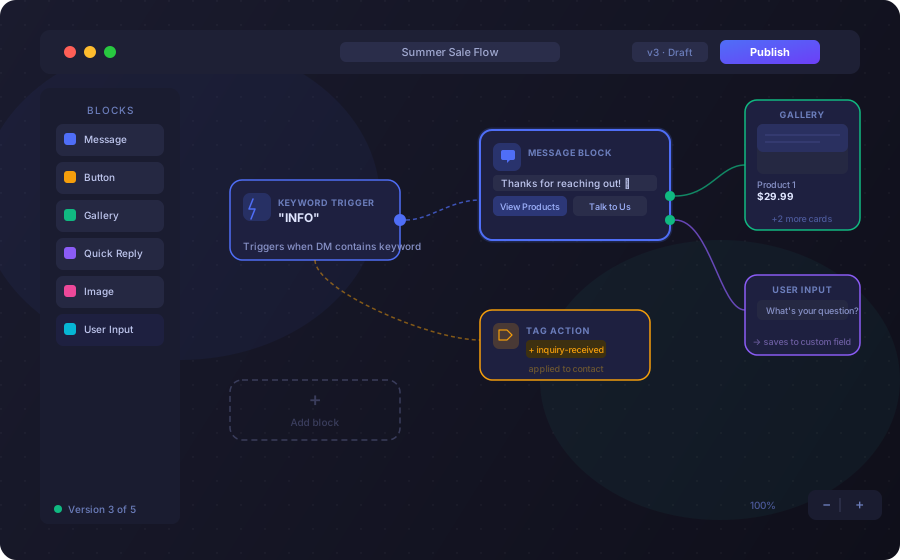
Design Conversations with a Visual, Node-Based Automation Builder
Create conversation systems visually so your chatbot structure stays clear, editable, and scalable as your automation grows.
- Build workflows using flexible nodes
- Connect triggers to actions
- Add buttons and quick replies
- Insert conditional logic automation
- Create branching conversation flow paths
- Send rich messages including text, images, videos, voice notes, and product galleries

Build Multi-Branch Automation with Conditional Logic
Your branching conversation flow can adapt in real time based on user behavior, profile state, and previous actions instead of static assumptions.
- If a user already submitted email, skip capture
- If a user is a follower, route them to a VIP path
- If not, guide them to follow first
- If a user has a specific tag, send tailored content
- If previous purchase is detected, offer an upsell

Turn Every Instagram Interaction into an Automated Flow
Every interaction can trigger a structured DM flow—so you can capture intent, respond instantly, and guide users into conversion-focused conversations.
- A user comments on a post or Reel
- A user replies to a Story
- A user sends a direct message
- A user comments during a Live

Capture Data and Segment Automatically
Turn Instagram into a structured lead system by collecting data, assigning tags, and segmenting contacts directly inside your automation.
- Create custom fields for text, number, boolean, and date
- Capture email addresses
- Store phone numbers
- Save user preferences
- Assign tags automatically

Build Once, Manage Everything, Scale Without Chaos
From cloning flows to managing versions and organizing your workspace, Elpidan helps you scale automation without complexity or confusion.
- Connect flows to build modular workflows
- Edit safely with draft & published versions
- Clone flows to reuse structure
- Organize flows into folders
- Pause or Run flows anytime

Why a Visual Flow Builder Beats Basic Auto Reply
| Basic Auto Reply ToolsSingle-response automation with limited logic. | Professional Visual Flow BuilderStructured conversation systems built to scale. | |
|---|---|---|
| Conversation design | Send one message | Design complete conversation systems |
| Branching | No branching conversation flow | Enable multi-branch automation |
| Personalization | Limited personalization | Use structured conditional logic automation |
| Outcomes | Cannot scale intelligently | Connect triggers to outcomes |
| Scale | Manual escalation required | Scale across thousands of conversations |
Built for Structured, Compliant Automation
Design structured follow-ups, user-initiated flows, and policy-aligned automation that respects Instagram's messaging rules.
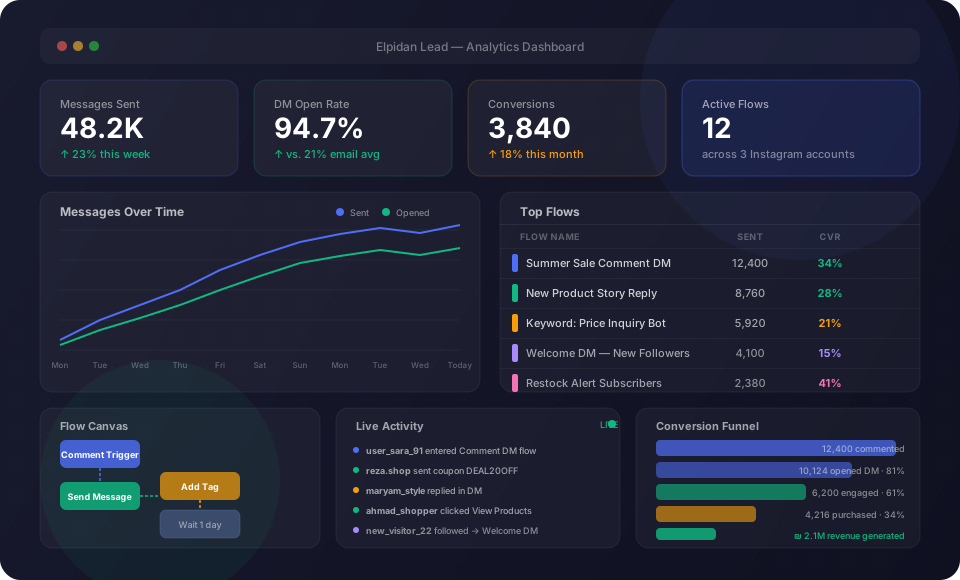
Flexible Enough for Every Instagram Growth Model
Use the same visual automation system to support creator engagement, ecommerce sales, coaching qualification, agency delivery, and service follow-ups.
Turn Conversations Into Structured Systems
Instagram DMs are not just messages. They are lead pipelines, sales funnels, qualification systems, and community growth channels.
FAQs About the Visual Flow Builder
Do I need coding skills to use the Visual Flow Builder?
No. It is a no-code automation builder with a drag-and-drop interface designed for non-technical users.
Can I build complex multi-step DM funnels?
Yes. You can create multi-branch automation flows with conditions, tags, delays, and structured conversation paths.
Can I edit a flow after it’s live?
Yes. You can update nodes, logic, and flow paths at any time without rebuilding the entire workflow.
Can I connect multiple triggers to the same flow?
Yes. A single flow can have multiple entry points such as comments, Story replies, keywords, and DMs.
How is this different from basic Instagram auto replies?
Basic auto replies send a single message, while a visual flow builder creates complete conversation systems with branching logic and user journeys.
Can I personalize conversations based on user behavior?
Yes. You can use conditions, tags, and user data to dynamically change the flow based on user actions and profile data.
Can the Visual Flow Builder scale for large campaigns?
Yes. Structured flows allow you to manage thousands of conversations simultaneously without manual effort.
Is the Visual Flow Builder compliant with Instagram policies?
Yes. It is built on structured, user-triggered automation aligned with Instagram’s messaging rules.